



推荐产品


-
-
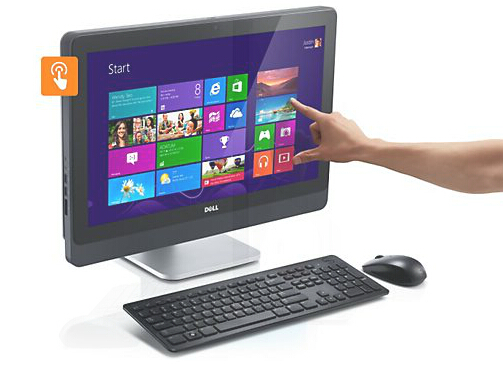
DELL OptiPlex 9020一体机
- 产品概述
- 规格参数
- 相关案例
以卓越的性能,实现最佳的工作效率
使用功能最强大的OptiPlex一体台式机,处理要求最严苛的任务。
最高可配备第四代智能英特尔®酷睿™处理器,以帮助提高工作效率。
Windows 8 Pro 或 Windows 7 Professional。
选择可选的23英寸窄边框多点触控屏,获得最佳的 Windows 8 体验。
利用硬盘、固态硬盘(SSD)或高性能固态混合硬盘(SSHD)选项,存储大量数据并实现快速访问。
利用高达32 GB的1600 MHz DDR3内存,轻松地并行运行多个应用程序。1
利用可选的独立显卡,提高视频性能。
Optiplex-9020-aio - The right fit for your workspace
The right fit for your workspace
Seamlessly integrate your space-saving all-in-one into any office environment and deploy on virtually any desk.
Conserve valuable desk space with a clean and simple all-in-one design.
Work comfortably in virtually any position using the optional articulated stand.
Further minimize desktop clutter with an optional wireless keyboard and mouse.
Deploy with flexibility and select from multiple configuration options. The All-in-One model is one of four OptiPlex chassis designs.
Optiplex-9020-aio - Connect, communicate and collaborate
Connect, communicate and collaborate
Communicate, collaborate and share across your entire organization with a full set of features to help you connect and interact.
Connect using onboard Gigabit Ethernet (GbE), optional Wireless LAN or optional Bluetooth®.
Easily set up VoIP communications with integrated front microphone and headphone mini-jacks.
Support fast data transfers with native high-speed USB 3.0 support.
Communicate face-to-face with optional Full HD camera, Microsoft® Lync® and Lync-certified headsets.
Make on-screen sharing easy with the panel’s wide viewing angle. Add a second monitor for dual-screen functionality.
Optiplex-9020-aio-Business class control
Business-class control
Easily control the entire desktop fleet and keep your business running smoothly with the most manageable all-in-one desktop featuring Intel® vPro™ and Dell unique extensions.
Remotely manage and update your desktops with next-generation Intel® vPro™ technology.
Perform one-to-many, out-of-band BIOS management with Dell’s unique Intel® vPro™ extensions for BIOS management and hard drive wipe.
Reduce costs to deploy, monitor and update systems with Dell’s automated tools and utilities for client systems management.
Centralized control and security through delivery of on-demand virtual desktops from the cloud to stateless and diskless Dell OptiPlex Cloud Desktops, powered by Dell Wyse WSM.
Protect data from desktop to the cloud
Protect your data no matter where it resides — from desktop to mobile to the cloud — with comprehensive security and encryption solutions.
Centrally manage data-encryption policies across devices without disrupting end users or existing IT processes with Dell Data Protection | Encryption (DDP | E).
Control access to systems and information with Dell Data Protection | Security Tools for single sign-on and authentication management.
Tighten security with integrated hardware such as self-encrypted drives and user-authentication options.
Delete data remotely with Dell’s custom Intel® vPro™ extension for remote hard drive wipe.
Physically secure your system with a lock slot, lockable port cover and lockable tabletop stand mount.
Exceptional reliability
Minimize your desktop maintenance with a durable all-in-one desktop that can stand the test of time. OptiPlex systems are subjected to highly accelerated life testing to help ensure long product life.
Long-term stability and support
The durable OptiPlex 9020 All-In-One is designed to stand the test of time and has a long product lifecycle, helping you maintain stability within your IT environment.
Continue to work through heavy use with an OptiPlex system that is subjected to highly accelerated life testing.
Manage transitions with confidence and help improve IT planning with a long product lifecycle.
Business-class support and service
Work confidently knowing you have access to comprehensive service and support. With Dell ProSupport2 and Dell services, IT can focus on business priorities.
Get 24x7 help from an expert engineer with optional Dell ProSupport, online or by phone, for assistance with unexpected hardware and software issues.
Simplify your deployment and create a standardized environment with Dell Configuration and Deployment Services and Dell Imaging Services.
Integrated solutions to protect and manage
Maximize the efficiency, security and management of your OptiPlex systems with robust, integrated solutions.
Dell Data Protection helps you secure data and control user access with comprehensive, flexible, easily managed data protection and access-control solutions.
Dell Systems Management with Dell KACE offers efficient, centralized and automated management to help you save time and money.
Dell Cloud Desktop and Dell Cloud Client Computing helps you improve service delivery to your desktops and enhance productivity with streamlined management and seamless access to data and resources.
Environmentally conscious
Help lower your power consumption and reduce your environmental footprint with a highly efficient OptiPlex all-in-one desktop.
ENERGY STAR 5.2 compliance and EPEAT registration provide assurance that your OptiPlex is energy smart.
An environmentally conscious design, including a chassis built from 10 percent postconsumer recycled plastics, can help lower your environmental footprint.
处理器选项
英特尔® Core™ i7 (4770S)
英特尔® 酷睿TM i5 (4670S, 4570S)
英特尔® Core™ i3 (4130)
操作系统选项
Windows® 7 专业版 32 位 (英文)
Windows® 7 专业版 32 位 (简体中文)
Windows® 7 专业版 64 位 (英文)
Windows® 7 专业版 64 位 (简体中文)
Windows 8.1 (64Bit) English
Windows 8.1 (64Bit) Simplified Chinsese
Windows 8.1 Pro (64位) 英文
Windows 8.1 Pro (64位) 简体中文
Windows 8.1 单语言 (64位) 英文
Windows 8.1 单语言 (64位) 简体中文
Windows 7 专业版, 英文, 64位 (含Windows 8.1 Pro 64位许可证和介质)
无操作系统, 专为 Dell Wyse 云桌面设计
Ubuntu Linux 12.04
Windows® 7 家庭普通版 32 位(英文)
Windows® 7 家庭普通版 32 位(简体中文)
Windows® 7 家庭普通版 64 位(英文)
Windows® 7 家庭普通版 64 位(简体中文)
Windows® 7 Ultimate 32bit - Embedded
Windows 7 专业版, 英文, 32位 (含Windows 8.1 Pro 64位 许可证和介质)
内存选项3
4GB (1x4GB) 1600MHz DDR3L
8GB (2x4GB) 1600MHz DDR3L
16GB (2x8GB) 1600MHz DDR3L
芯片组选项
英特尔®Q87高速芯片组
显卡选项
Intel ®集成显卡, Dell OptiPlex
AMD Radeon 显卡 (无适配器), Dell OptiPlex AIO
硬盘选项
最高1000 GB SATA硬盘 (7200RPM)
最高500 GB 硬盘 (5400RPM)
最高256 GB SATA 固态硬盘硬盘
光驱选项
戴尔8合1介质卡读卡器(标配)
支持可选的光驱
连接性
集成英特尔®I217LM以太网LAN 10/100/1000;支持可选的802.11n无线网卡和带蓝牙的可选802.11m无线网卡
注意,要支持英特尔®博锐™技术,需要集成的英特尔连接
系统管理
包括戴尔独特的博锐技术扩展功能的英特尔®博锐技术(iAMT 9.x);英特尔®标准可管理性;无带外系统管理
法规
环境标准(生态标签):能源之星5.2、EPEAT注册4、CECP、WEEE、日本能源法、韩国生态标签、欧盟RoHS、中国RoHS
其他环保选项:碳补偿计划;资产转售和回收服务
产品安全、EMC和环境数据表(英文版)
戴尔法规合规性主页(英文版)
戴尔和环境(英文版)
电源选项
效率高达90 %的200 W高效PSU(80 PLUS金牌认证);符合能源之星5.2规范的主动式PFC
保修
有限硬件保修5;标准3年期远程诊断后上门服务6(3-3-3);可选的3年期面向IT人员的Dell ProSupport™2;4年期和5年期服务和支持选项2
机箱包含项
非触控系统
系统尺寸(不含支架)(高 x 宽 x 深)(英寸/厘米):15.2 x 22.6 x 2.7/38.6 x 57.4 x 6.8(最小值)
系统重量(磅/千克):16.8/7.6
支架:基本支架
支架深度(英寸/厘米):8.7/22
支架重量(磅/千克):5.28/2.4
类型:可选的200万像素固定网络摄像头(带滑动门)
触控系统
系统尺寸(不含支架)(高 x 宽 x 深)(英寸/厘米):15.2 x 22.6 x 2.8/38.6 x 57.4 x 7.2(最小值)
系统重量(磅/千克):20.8/9.44
支架:铰接支架
支架深度(英寸/厘米):9.84/25
支架重量(磅/千克):6.6/3
类型:可选的200万像素可倾斜网络摄像头
I/O端口
4个外置USB 3.0端口(侧面和背面各2个)和4个外置USB 2.0端口;1个RJ-45端口;1个VGA端口;1个HDMI端口;2个PS/2端口;1个线路输入端口(立体声/麦克风)、2个线路输出端口(1个在侧面,用于耳机/1个在背面,用于扬声器)
外围设备选项7
显示器:
戴尔入门级标准及宽屏模拟液晶显示器:
Dell E1713S、E1913S、E1913、E1912H、E2013H、E2213H
戴尔专业数字标准及宽屏液晶显示器:
Dell P1913S、P1913。P2012H、P2212H、P2312H
键盘:戴尔USB入门级键盘、戴尔多媒体专业键盘、戴尔智能卡键盘、戴尔无线键盘;鼠标:戴尔USB光电鼠标、戴尔激光鼠标、戴尔无线鼠标(与戴尔无线键盘配套)
音频扬声器:内置戴尔音频扬声器(标配)
显示屏
带防炫光涂层的23英寸WLED、1920 x 1080全高清分辨率;带光面涂层的可选投射电容式触摸屏
摄像头
非触控系统
类型:可选的200万像素固定网络摄像头(带滑动门)
触控系统
类型:可选的200万像素可倾斜网络摄像头


